• Skip to primary navigation
  • Skip to main content
  • Skip to primary sidebar

An Antic Disposition

  • Home
  • About
  • Archives
  • Writings
  • Links
You are here: Home / Archives for Rob

Rob

How to Write a Standard (If You Must)

2006/12/06 By Rob 6 Comments

Standards are generally a bad idea. They reduce freedom-of-action and limit choice. But sometimes you must have one in order to pacify an anti-business regulator or other socialist-leaning bureaucrat. So what should you do if you find you find yourself in the awkward position of coming up short in the standards department? By all means, create a standard and do it quickly! I offer here some observations on best-practices, and tried-and-true advice on how to make a standard quickly, with little pain or risk.

First some background. Standards writing, as generally practiced, is a multilateral, deliberative process where multiple points of view are considered and discussed, where consensus is reached and then documented. This must be avoided at all costs. The delays introduced by such a consensus process are considerable and the outcome of such a process does not justify that time investment. If you already have a monopoly, why waste time on a consensus? Consider the notable failures of XHTML, XForms, SVG, XSLT, etc. Look at the multiple implementations of these standards, including viral copyleft and IP-deficient products. Do you really want to see this trend continued?

Start with a complete product implementation. This makes the entire process much faster since there is no time wasted discussing such abstract, heady things as interoperability, reuse, generality, elegance, etc. Only Perpetual Adoration of the One True Implementation (the one you already have) will quickly lead to a specification. Avoid consideration of alternatives. Consideration of alternatives is your prime risk factor for introducing delay.

If possible choose an implementation that has layers of complexity from years of undisciplined agglomeration of features. Of course this will lead to a specification of Byzantine complexity and epic length. But since no one will actually read the specification, there is no harm. In fact the length and complexity can bring several benefits:

  1. Any criticism of the specification can automatically be dismissed as nitpicking. For example, if you are presented with a list of 500 faults in a 6,000 pages specification, you can respond, “That is less than 10%. You are just nitpicking. We can fix that in release 1.1”. Or you can even just rely on the familiar justification, “Shipping is a feature”. Any finite list of defects can be made minuscule by a sufficiently large specification.
  2. Further, since review periods at ISO and most other standards bodies are of fixed length, regardless of the length of the specification, a sufficiently large specification will ensure that it receives no, or only cursory review. Divide the length of the specification in pages, by the length of the review period in days. A Freshman English major might be assigned reading of 50 pages per day. Aim to double or triple this reading load. 100+ pages/day is a good rule of thumb to ensure that a volunteer on a standards committee will not be able conduct a thorough review.
  3. The pure size of the specification will imply to some that it is a well-considered, comprehensive and cohesive document. Just like the IRS tax regulations and the federal budget.
  4. In case of emergency the specification can be burned as fuel

Shop around for the best standards development organization (SDO), one that knows how to get the job done quickly. Evaluation criteria include:

  1. A proven ability to approve standards quickly. You are not interested in advancing the state of the art here. You want fast-in-fast-out-stamp-my-ticket processing so you can get on with your business.
  2. A membership model that effectively exclude individual experts and open source projects from the process.
  3. A demonstrated competency in maintaining needed secrecy when developing sensitive standards.
  4. The right to make FastTrack submissions to ISO

Ecma International approved the DVD-RAM, DVD-R, DVD+R, DVD-RW and DVD+RW standards. Although some falsely claim that these overlapping standards have confused consumers, it is clear that having these multiple formats has given manufacturers ample opportunity for upselling multi-format DVD players and burners. With a single format, where is the upsell? Ecma clearly understands the purpose of standards and can be relied upon.

Once you are in an SDO and are ready to create your Technical Committee, be sure to carefully consider the topics of membership and charter. Of course, you’ll want to assemble a team of willing partners. Loyalty can be obtained in many ways. Your consigliari may have some ideas.

You charter is your first line of defense. Since your Technical Committee may contain some technical people, you will want to strictly limit what they discuss. Technical people are dangerous if they are given too much freedom. Who knows what they may do if left on their own? They might even innovate (shudder), and innovation is so disruptive. A well-written Charter can prevent innovation, that unwelcome guest, from ever knocking on your door.

Since its terms restricts the scope of your work, you should ensure that your charter contains any restrictions that you do not want to discuss or defend in the future. Best to get these front loaded into the charter so you can just say, “We have no choice; that is our Charter”. Your goal is to describe the One True Implementation, so a good charter restriction to add is one which will focus the technical committee on that one single task. A roundabout way of doing this is to require that the produced specification must remain 100% compatible with a different specification, one which is your secret. That way you, and only you, can decide whether or not a proposed change is within scope of the charter. This provides a lot of flexibility and avoids unnecessary discussions. “We checked the secret specification and it says that October has 40 days in it. Sorry guys, there is really nothing we can do. The Charter won’t let us.”

A few additional recommendations for the the day-to-day work of describing the One True Implementation:

  • Observe other successful standards and the process that lead to them. Look at the size of their specifications and how long it took to develop that. Assume that you can safely progress at a rate 10-20x faster. This pace is justified by the superiority of your One True Implementation and your lack of deliberations, discussions or considerations of alternatives.
  • At all costs avoid reusing any existing standards. Reuse of standards will only lead to generality, interoperability and increased reuse and risk getting you involved in discussions with other standards bodies. This delay must be avoided. The One True Implementation has everything you or anyone else needs to know. It is the true fons et origo of all wisdom and knowledge.
  • This also implies that you do not engage other standards groups. Assume that your hand-picked technical committee is an expert on everything. In any case, expertise is irrelevant, since you are merely describing the One True Implementation. All the decision making essentially already occurred years ago. Your task is just writing it down.
  • Secrecy is paramount. If the unwashed masses find out what you are discussing and what issues you face, they might do things like offer you suggestions or alternatives. That is so annoying. So all meetings, minutes, mailing lists, etc., should all be strictly private.

That’s about it. Eveything else is just common sense. Think Speed. Think Heft. Focus on the One True Implementation. I believe the liberal application of the above principles should enable anyone to quickly and painlessly create an International Standard.

Filed Under: Standards Tagged With: Ecma, OOXML, Satire

The worm in the apple

2006/12/05 By Rob 3 Comments

Via CrunchGear, MacWorld UK, and APC Magazine — Mac Office users seem to have no way of reading the new OOXML files which Office 2007 for Windows writes by default. APC quotes a Microsoft Mac Business Unit spokeperson as saying, “Unfortunately it is still to early for us to say when the converters will be available”.

Whoops.

As a public service I note two alternatives: the Mac port in OpenOffice.org and NeoOffice.


9 December 2006 Update: Interesting analysis from from Andrew Shebanow over at Shebanation: How adding OOXML support to the Mac is likely 150 person-year effort. And Mary Jo Foley’s Unblinking Eye points out that the problem is not just with the Mac support. Windows Mobile 5.0 will lack OOXML support until mid-2007.

Is it just me, or does this seem like something less than a coordinated roll-out? The clean, hassle-free way of doing this, with the least suffering for users and admins, would have been like this: Ship Office 2007 with OOXML support, but not as the default. Then over the next year get the rest of the Office ecosystem working with OOXML: the Mac, Mobile, Sharepoint, Excel Live, etc. Get all of the support out there, but don’t force it on people yet as a default. When all the pieces are ready then, via a service pack or version upgrade, change the defaults. Everything goes smoothly from there.

The fact that they didn’t follow this roll-out model suggests that someone at Microsoft really, really, really wanted to get OOXML out fast, even if it wasn’t pretty.

Luckily admins do have the ability to perform a more orderly roll-out in their organizations if they wish. The default format for Office applications can be changed via a registry entry. For example, for Excel the registry entry is:

HKCU\Software\Microsoft\Office\12.0\Excel\Options\DefaultFormat

By default it isn’t there, but you can create an entry of type REG_DWORD and assign it the value of 56 (38 hexadecimal). Once you’ve made that change, Excel documents will be saved in the legacy binary formats by default. Similar registry settings for Word and PowerPoint are:

HKCU\Software\Microsoft\Office\12.0\Word\Options\DefaultFormat

create REG_SZ with value of “Doc”

and

HKCU\Software\Microsoft\Office\12.0\PowerPoint\Options\DefaultFormat

create REG_DWORD with value of 0

It should be trivial for someone with a Windows compiler to create a simple application to accomplish this same task. Ideally it would also allow the default to be changed to any other format of the admin’s choice, including turning it back to OOXML if/when admins desire to deploy that way, or changing it to ODF when a good Plugin is available.

10 December 2006 Update: My attention has been drawn to an earlier post from a lead in Microsoft’s Mac Business Unit, where the removal of support for Visual Basic macros is discussed. Damn, that’s cold. Ever get the feeling you’ve been marked for extermination?

17 May 2007 Update: From News.com “Microsoft delays Office convertors for Mac” and some great follow-up analysis by Andrew Shebanow over at Shebanation.

30 May 2007 Update: More analysis and commentary on this ongoing issue from Joe Wilcox over at Microsoft Watch:

Meanwhile, Microsoft makes big noise about interoperability. What kind of example does Microsoft set when the formats for its Mac and Windows Office suites aren’t interoperable? Irreconcilable is the position of increased Microsoft-and-other platform interoperability and the decreased interoperability between Office file formats across two platforms.

Filed Under: OOXML

Some short notes

2006/12/03 By Rob Leave a Comment

I’ve updated the blog to use Google’s new “beta” Blogger software. I haven’t noticed any glitches, but please let me know if anything seems broken. They’ve updated their feed to support Atom 1.0 which is great. Previously they served up Atom 0.3 which I then updated to 1.0 via this mechanism.

Also, the new Blogger has added item tagging support via the Rel-Tag microformat. (Blogger calls them “Labels”). I had been using Technorati tags for this purpose, but the integrated UI in the new Blogger is worth the work of switching over, so you may notice a little churn in old entries as I convert.

As you probably have heard, OpenDocument Format (ODF) has been official published by ISO as ISO/IEC 26300:2006, as you can see here. This is the culmination of almost four years of effort by the OASIS TC. Also note that ISO/IEC JTC/SC34 had a ballot last July to request that JTC1 make the final ISO version of ODF freely available for download at no charge. Until that happens, you can purchase an ISO version from the ISO web site, or download an OASIS version at the OASIS ODF TC’s web site. The content should be identical. Eventually the ISO version should be downloadable for free as well.

Another member of the ODF community has started up a blog. Florian Reuter, an ODF TC member who recently joined Novell, discusses some suggested enhancements for ODF 1.2.

Finally, OpenOffice.org has announced the winners of their Template/Clipart Contest. The templates of course are in ODF format, so this is a good illustration of the richness and capabilities of the format. Linux.com has the details.

Filed Under: Blogging/Social, ODF Tagged With: Blogger

Beware of Geeks Bearing Gifts

2006/11/27 By Rob 4 Comments

Some interesting news, via Bob Sutor.

Let’s take a closer look at the what is being offered as part of this “royalty free” deal from Microsoft.

At first it appears like an early Christmas present from Microsoft, a royalty-free license to the Office UI for “software vendors who wish to incorporate the 2007 Microsoft Office User Interface into their own products.” Woo hoo!

Now to be totally honest, I must admit that I’m not a big fan of the new Office ribbon UI. It smacks a bit too much of the kind of New, Improved Packaging! campaign that snack food companies engage in periodically. It is the same junk food in the end, with a new wrapper. But the domination of Microsoft is so great on the client, that their UI whim is practically the law for everyone else. So we must pay attention. Their market presence defines the norms, and these norms define user expectations and therefore intuitiveness. User interface guru Jakob Nielsen said it well:

If anybody else introduced a new user interface paradigm, it would probably remain a curiosity for years, but Microsoft Office has a special status as the world’s most-used interaction design. We know from user testing that users often demand that other user interfaces work like Office. When you’re used to one style most of the day, you want it in other applications and screens as well.

So, any genuine attempt to encourage the free and open use of new UI paradigms is to be applauded. The current Windows UI is certainly the result of an industry-wide evolution, with contributions from Xerox, Apple, IBM, NeXt and many others. Although Microsoft is the main beneficiary of this UI consolidation, they were not the sole contributors. So it is good to share the love and continue this evolution.

But then we read the fine print in what Microsoft is offering:

The program does not involve code or technical specifications and there are no protocols or file formats either.

OK. So what exactly are they offering? Answer:

pending utility and design patent claims, copyrights, trade dress and trademark rights.

OK. Another one of those, “We got stuff; you’ll need to deal with us” FUD messages. Odd that they aren’t offering any code or technical specifications, but they are still claiming copyright? Anyone remember Lotus v. Borland? “Method of operation” ring a bell?

We read further:

Your Licensed UI must comply with the Design Guidelines. If Microsoft notifies you that the Design Guidelines have been updated or that you are not complying with the Design Guidelines, you will make the necessary changes to comply as soon as you reasonably can, but no later than your next product release that is 6 months or more from the date you receive notice.

So once you accept this license, Microsoft can pretty much jerk you around whenever they want. I’ve seen terms like this before when licensing redistributable code modules. But has anyone seen this for merely following someone’s UI guidelines?

It gets still stranger:

This license contains no sub-license rights. If you allow others to use, copy, modify or distribute your Licensed UI in their products, your contract with them must state that they receive no Microsoft rights in the Licensed UI from you.

Not very open source friendly, is this? You can marry into the family and get protection from the Godfather, but you can’t transfer this to anyone. They need to make their own accommodation with Microsoft.

This makes me wonder about the Microsoft-funded ODF Add-in for Word that Clever Age and others are working on. This add-in does UI-level manipulations of the Office 2007 ribbon. Are they covered under Microsoft’s license program? Are their user’s covered? What about anyone who takes the source code and modifies it and redistributes it?

And then the nail in the coffin:

“Excluded Products” software products or components, or web-based or hosted services that perform primarily the same general functions as the Microsoft Office Word, Excel, PowerPoint, Outlook and Access software applications, and that are created or marketed as a replacement for any or all of those Microsoft applications.

So here the mask of openness falls off and we see this for what it is. This is very reminiscent of the original license on the Microsoft binary file formats, back in the days when the specifications were published on MSDN CD’s:

[Y]ou may use documentation identified in the MSDN Library portion of the SOFTWARE PRODUCT as the file format specification for Microsoft Word, Microsoft Excel, Microsoft Access, and/or Microsoft PowerPoint (“File Format Documentation”) solely in connection with your development of software product(s) that operate in conjunction with Windows or Windows NT that are not general purpose word processing, spreadsheet, or database management software products or an integrated work or product suite whose components include one or more general purpose word processing, spreadsheet, or database management software products.

Interestingly in that case, once they achieved their goal of total market domination, Microsoft removed the file format documentation from MSDN and it was only available under a special license. They started open, in order to gain market domination, but once their goals were achieved, the openness ended. What prevents this from happening again?

Caveat emptor, even when it appears to be free. The first one always is.

Filed Under: Office

Happy Thanksgiving

2006/11/22 By Rob 4 Comments

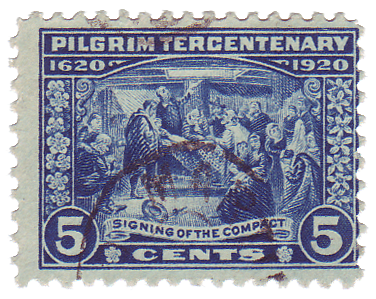
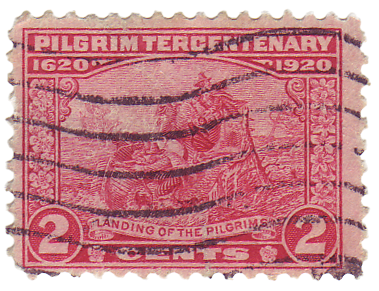
1920 was the 300th anniversary of the landing at Plymouth of the Puritan separatists. In commemoration of this tercentenary, three stamps were issued based on designs by the Bureau of Engraving and Printing’s chief designer, Clair Aubrey Huston. Let’s take a closer look.

The 1-cent green “Mayflower” (Scott #548) was based on a photograph of a ship model held by the Smithsonian Institution. Perhaps this historic photograph is close to what Huston used as a model. I wonder if the stamp design was intentionally reversed to have the ship coming from the right, which in our Northern hemisphere minds is necessary to symbolize travel from the East?

The 2-cent carmine rose “Landing of the Pilgrims” (Scott #549) was based on the reverse of the $5 Federal Reserve Notes series of 1914. You can see that design here.

The 5-cent deep blue “Signing of the Compact” (Scott #550) was based on a painting by the Massachusetts painter Edwin White. White is better known for his painting, “Washington Resigning His Commission” which is in the Maryland State House.

Note the unifying ornament in the vertical borders, and flanking the word “cents”. This looks very much like the official Massachusetts state flower, the Mayflower.

All three of these stamps share one common trait. Or more precisely, they all lack something that every other U.S. stamp has. Can you spot what is missing? Here’s a clue: Stamps of Great Britain lack this feature as well.

A true Thanksgiving stamp was not issued by the USPS until 2001. I don’t know about you, but I like the old engraved designs better. Today’s stamps look too much like Pokémon stickers.

Filed Under: Philately Tagged With: Massachusetts, Mayflower, Pilgrims, Thanksgiving

  • « Go to Previous Page
  • Page 1
  • Interim pages omitted …
  • Page 59
  • Page 60
  • Page 61
  • Page 62
  • Page 63
  • Interim pages omitted …
  • Page 69
  • Go to Next Page »

Primary Sidebar

Copyright © 2006-2026 Rob Weir · Site Policies