Evidently today is National Grammar Day. I am not a fan.
Like most Americans of my generation I was taught to identify parts of speech, diagram sentences and intone with the rest of the class the mysteries of the three-and-twenty most holy helping verbs: “is, am, are, was, were, be, being, been, have, has, had, do, did, does, may, must, might, can, could, will, would, shall, should”. Because I was good at it, and felt a call to the service of pedantry, I continued my novitiate in stranger accents, in German, Latin and Greek.
I was well on my path the the priesthood of a grammarian, when in 1992 I abandoned all my vows in a bus in Somerville, Massachusetts, when a drunk showed me what language was really all about.

I’m not one to start a conversation with a stranger — even a sober one — on public transportation. But in this case I had little choice in the matter, since this particular gentleman insisted on initiating a debate on the virtues of the Allman Brothers, a subject which I was neither equipped nor inclined to discuss with him.
When I expressed my disinclination to debate, and further, my ignorance of all things Allman, the dear fellow was offended and let out a string of expletives, starting with “Un-freakin’-believable” (albeit with a more emphatic, saltier interposed participial adjective than I can relate to you here) and continuing for several minutes. Nothing he said was grammatical. Little was even coherent. But what I did understand was pure genius. I wish I had a tape recorder. As my stop approached, I hesitated a moment, intending to thank the man, offer him my congratulations and laud him as a poet of the first order. But the smell, as well as my own instinct for self-preservation, held me in abeyance.
Since that day I have been an apostate to grammar. I think we should all have a range of ways to speak and write, and should be able to modulate according to circumstances. Language is like a wardrobe. A man should have jogging shorts as well as a tuxedo. In the end, language is not about rules. It is about suiting the words to the occasion, of putting the right words in the right places, and what is “right’ will depend on circumstances.
So down with grammar, down with the rules! Go, split an infinitive, dangle your participles, and like my good friend on the #86 bus, even separate your inseparable prefixes. To quote Duke Ellington, “If it sounds good, it is good”. And remember that the goal in the end is expression and understanding. If you are understood, then you’ve accomplished more than many.
As Gertrude Stein wrote:
Clarity is of no importance because nobody listens and nobody knows what you mean no matter what you mean, nor how clearly you mean what you mean. But if you have vitality enough of knowing enough of what you mean, somebody and sometime and sometimes a great many will have to realize that you know what you mean and so they will agree that you mean what you know, what you know you mean, which is as near as anybody can come to understanding anyone.
Doing the Microsoft Shuffle: Algorithm Fail in Browser Ballot
March 6th Update: Microsoft appears to have updated the www.browserchoice.eu website and corrected the error I describe in this post. More details on the fix can be found in The New & Improved Microsoft Shuffle. However, I think you will still find the following analysis interesting.
-Rob
Introduction
The story first hit in last week on the Slovakian tech site DSL.sk. Since I am not linguistically equipped to follow the Slovakian tech scene, I didn’t hear about the story until it was brought up in English on TechCrunch. The gist of these reports is this: DSL.sk did a test of the “ballot” screen at www.browserchoice.eu, used in Microsoft Windows 7 to prompt the user to install a browser. It was a Microsoft concession to the EU, to provide a randomized ballot screen for users to select a browser. However, the DSL.sk test suggested that the ordering of the browsers was far from random.
But this wasn’t a simple case of Internet Explorer showing up more in the first position. The non-randomness was pronounced, but more complicated. For example, Chrome was more likely to show up in one of the first 3 positions. And Internet Explorer showed up 50% of the time in the last position. This isn’t just a minor case of it being slightly random. Try this test yourself: Load www.browserchoice.eu, in Internet Explorer, and press refresh 20 times. Count how many times the Internet Explorer choice is on the far right. Can this be right?
The DLS.sk findings have lead to various theories, made on the likely mistaken theory that this is an intentional non-randomness. Does Microsoft have secret research showing that the 5th position is actually chosen more often? Is the Internet Explorer random number generator not random? There were also comments asserting that the tests proved nothing, and the results were just chance, and others saying that the results are expected to be non-random because computers can only make pseudo-random numbers, not genuinely random numbers.
Maybe there was cogent technical analysis of this issue posted someplace, but if there was, I could not find it. So I’m providing my own analysis here, a little statistics and a little algorithms 101. I’ll tell you what went wrong, and how Microsoft can fix it. In the end it is a rookie mistake in the code, but it is an interesting mistake that we can learn from, so I’ll examine it in some depth.
Are the results random?
The ordering of the browser choices is determined by JavaScript code on the BrowserChoice.eu web site. You can see the core function in the GenerateBrowserOrder function. I took that function and supporting functions, put it into my own HTML file, added some test driver code and ran it for 10,000 iterations on Internet Explorer. The results are as follows:
| Position | I.E. | Firefox | Opera | Chrome | Safari |
|---|---|---|---|---|---|
| 1 | 1304 | 2099 | 2132 | 2595 | 1870 |
| 2 | 1325 | 2161 | 2036 | 2565 | 1913 |
| 3 | 1105 | 2244 | 1374 | 3679 | 1598 |
| 4 | 1232 | 2248 | 1916 | 590 | 4014 |
| 5 | 5034 | 1248 | 2542 | 571 | 605 |
| Position | I.E. | Firefox | Opera | Chrome | Safari |
|---|---|---|---|---|---|
| 1 | 0.1304 | 0.2099 | 0.2132 | 0.2595 | 0.1870 |
| 2 | 0.1325 | 0.2161 | 0.2036 | 0.2565 | 0.1913 |
| 3 | 0.1105 | 0.2244 | 0.1374 | 0.3679 | 0.1598 |
| 4 | 0.1232 | 0.2248 | 0.1916 | 0.0590 | 0.4014 |
| 5 | 0.5034 | 0.1248 | 0.2542 | 0.0571 | 0.0605 |
This confirms the DSL.sk results. Chrome appears more often in one of the first 3 positions and I.E. is most likely to be in the 5th position.
You can also see this graphically in a 3D bar chart:
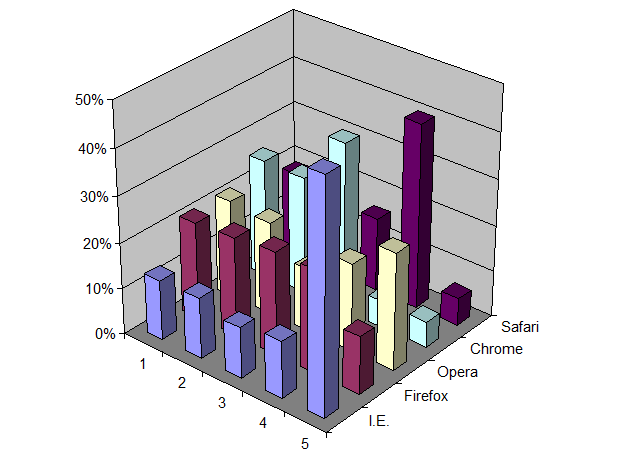
But is this a statistically significant result? I think most of us have an intuitive feeling that results are more significant if many tests are run, and if the results also vary much from an even distribution of positions. On the other hand, we also know that a finite run of even a perfectly random algorithm will not give a perfectly uniform distribution. It would be quite unusual if every cell in the above table was exactly 2,000.
This is not a question one answers with debate. To go beyond intuition you need to perform a statistical test. In this case, a good test is Pearson’s Chi-square test, which tests how well observed results match a specified distribution. In this test we assume the null-hypothesis that the observed data is taken from a uniform distribution. The test then tells us the probability that the observed results can be explained by chance. In other words, what is the probability that the difference between observation and a uniform distribution was just the luck of the draw? If that probability is very small, say less than 1%, then we can say with high confidence, say 99% confidence, that the positions are not uniformly distributed. However, if the test returns a larger number, then we cannot disprove our null-hypothesis. That doesn’t mean the null-hypothesis is true. It just means we can’t disprove it. In the end we can never prove the null hypothesis. We can only try to disprove it.
Note also that having a uniform distribution is not the same as having uniformly distributed random positions. There are ways of getting a uniform distribution that are not random, for example, by treating the order as a circular buffer and rotating through the list on each invocation. Whether or not randomization is needed is ultimately dictated by the architectural assumptions of your application. If you determine the order on a central server and then serve out that order on each innovation, then you can use non-random solutions, like the rotating circular buffer. But if the ordering is determined independently on each client, for each invocation, then you need some source of randomness on each client to achieve a uniform distribution overall. But regardless of how you attempt to achieve a uniform distribution the way to test it is the same, using the Chi-square test.
Using the open source statistical package R, I ran the chisq.test() routine on the above data. The results are:
X-squared = 13340.23, df = 16, p-value < 2.2e-16
The p-value is much, much less than 1%. So, we can say with high confidence that the results are not random.
Repeating the same test on Firefox is also non-random, but in a different way:
| Position | I.E. | Firefox | Opera | Chrome | Safari |
|---|---|---|---|---|---|
| 1 | 2494 | 2489 | 1612 | 947 | 2458 |
| 2 | 2892 | 2820 | 1909 | 1111 | 1268 |
| 3 | 2398 | 2435 | 2643 | 1891 | 633 |
| 4 | 1628 | 1638 | 2632 | 3779 | 323 |
| 5 | 588 | 618 | 1204 | 2272 | 5318 |
| Position | I.E. | Firefox | Opera | Chrome | Safari |
|---|---|---|---|---|---|
| 1 | 0.2494 | 0.2489 | 0.1612 | 0.0947 | 0.2458 |
| 2 | 0.2892 | 0.2820 | 0.1909 | 0.1111 | 0.1268 |
| 3 | 0.2398 | 0.2435 | 0.2643 | 0.1891 | 0.0633 |
| 4 | 0.1628 | 0.1638 | 0.2632 | 0.3779 | 0.0323 |
| 5 | 0.0588 | 0.0618 | 0.1204 | 0.2272 | 0.5318 |
On Firefox, Internet Explorer is more frequently in one of the first 3 positions, while Safari is most often in last position. Strange. The same code, but vastly different results.
The results here are also highly significant:
X-squared = 14831.41, df = 16, p-value < 2.2e-16
So given the above, we know two things: 1) The problem is real. 2) The problem is not related to a flaw only in Internet Explorer.
In the next section we look at the algorithm and show what the real problem is, and how to fix it.
Random shuffles
The browser choice screen requires what we call a “random shuffle”. You start with an array of values and return those same values, but in a randomized order. This computational problem has been known since the earliest days of computing. There are 4 well-known approaches: 2 good solutions, 1 acceptable (“good enough”) solution that is slower than necessary, and 1 bad approach that doesn’t really work. Microsoft appears to have picked the bad approach. But I do not believe there is some nefarious intent to this bug. It is more in the nature of a “naive” algorithm”, like the bubble sort, that inexperienced programmers inevitably will fall upon when solving a given problem. I bet if we gave this same problem to 100 freshmen computer science majors, at least one of them would make the same mistake. But with education and experience, one learns about these things. And one of the things one learns early on is to reach for Knuth.
The Art of Computer Programming, Vol. 2, section 3.4.2 “Random sampling and shuffling” describes two solutions:
- If the number of items to sort is small, then simply put all possible orderings in a table and select one ordering at random. In our case, with 5 browsers, the table would need 5! = 120 rows.
- “Algorithm P” which Knuth attributes to Moses and Oakford (1963), but is now known to have been anticipated by Fisher and Yates (1938) so it is now called the Fisher-Yates Shuffle.
Another solution, one I use when I need a random shuffle in a database or spreadsheet, is to add a new column, fill that column with random numbers and then sort by that column. This is very easy to implement in those environments. However, sorting is an O(N log N) operation where the Fisher-Yates algorithm is O(N), so you need to keep that in mind if performance is critical.
Microsoft used none of these well-known solutions in their random solution. Instead they fell for the well-known trap. What they did is sort the array, but with a custom-defined comparison function or “comparator”. JavaScript, like many other programming languages, allows a custom comparator function to be specified. In the case of JavaScript, this function takes two indexes into the value array and returns a value which is:
- <0 if the value at the first index should be sorted before the value at the second index
- 0 if the values at the first index and the second index are equal, which is to say you are indifferent as to what order they are sorted
- >0 if the value at the first index should be sorted after the value at the second index
This is a very flexible approach, and allows the programmer to handle all sorts of sorting tasks, from making case-insensitive sorts to defining locale-specific collation orders, etc..
In this case Microsoft gave the following comparison function:
function RandomSort (a,b)
{
    return (0.5 - Math.random());
}
Since Math.random() should return a random number chosen uniformly between 0 and 1, the RandomSort() function will return a random value between -0.5 and 0.5. If you know anything about sorting, you can see the problem here. Sorting requires a self-consistent definition of ordering. The following assertions must be true if sorting is to make any sense at all:
- If a<b then b>a
- If a>b then b<a
- If a=b then b=a
- if a<b and b<c then a<c
- If a>b and b>c then a>c
- If a=b and b=c then a=c
All of these statements are violated by the Microsoft comparison function. Since the comparison function returns random results, a sort routine that depends on any of these logical implications would receive inconsistent information regarding the progress of the sort. Given that, the fact that the results were non-random is hardly surprising. Depending on the exact search algorithm used, it may just do a few exchanges operations and then prematurely stop. Or, it could be worse. It could lead to an infinite loop.
Fixing the Microsoft Shuffle
The simplest approach is to adopt a well-known and respected algorithm like the Fisher-Yates Shuffle, which has been known since 1938. I tested with that algorithm, using a JavaScript implementation taken from the Fisher-Yates Wikpedia page, with the following results for 10,000 iterations in Internet Explorer:
| Position | I.E. | Firefox | Opera | Chrome | Safari |
|---|---|---|---|---|---|
| 1 | 2023 | 1996 | 2007 | 1944 | 2030 |
| 2 | 1906 | 2052 | 1986 | 2036 | 2020 |
| 3 | 2023 | 1988 | 1981 | 1984 | 2024 |
| 4 | 2065 | 1985 | 1934 | 2019 | 1997 |
| 5 | 1983 | 1979 | 2092 | 2017 | 1929 |
| Position | I.E. | Firefox | Opera | Chrome | Safari |
|---|---|---|---|---|---|
| 1 | 0.2023 | 0.1996 | 0.2007 | 0.1944 | 0.2030 |
| 2 | 0.1906 | 0.2052 | 0.1986 | 0.2036 | 0.2020 |
| 3 | 0.2023 | 0.1988 | 0.1981 | 0.1984 | 0.2024 |
| 4 | 0.2065 | 0.1985 | 0.1934 | 0.2019 | 0.1997 |
| 5 | 0.1983 | 0.1979 | 0.2092 | 0.2017 | 0.1929 |
Applying Pearson’s Chi-square test we see:
X-squared = 21.814, df = 16, p-value = 0.1493
In other words, these results are not significantly different than a truly random distribution of positions. This is good. This is what we want to see.
Here it is, in graphical form, to the same scale as the “Microsoft Shuffle” chart earlier:

Summary
The lesson here is that getting randomness on a computer cannot be left to chance. You cannot just throw Math.random() at a problem and stir the pot, and expect good results. Random is not the same as being casual. Getting random results on a deterministic computer is one of the hardest things you can do with a computer and requires deliberate effort, including avoiding known traps. But it also requires testing. Where serious money is on the line, such as with online gambling sites, random number generators and shuffling algorithms are audited, tested and subject to inspection. I suspect that the stakes involved in the browser market are no less significant. Although I commend DSL.sk for finding this issue in the first place, I am astonished that the bug got as far as it did. This should have been caught far earlier, by Microsoft, before this ballot screen was ever made public. And if the EC is not already demanding a periodic audit of the aggregate browser presentation orderings, I think that would be a prudent thing to do.
If anyone is interested, you can take a look at the file I used for running the tests. You type in an iteration count and press the execute button. After a (hopefully) short delay you will get a table of results, using the Microsoft Shuffle as well as the Fisher-Yates Shuffle. With 10,000 iterations you will get results in around 5 seconds. Since all execution is in the browser, use larger numbers at your own risk. At some large value you will presumably run out of memory, time out, hang, or otherwise get an unsatisfactory experience.

How to photograph an asteroid
Over the years, I’ve seen Mercury, Venus, Mars, Jupiter and Saturn with my naked eyes. And I’ve seen Uranus and Neptune through a telescope. But I’ve never seen an asteroid until last night, when I photographed the 2nd largest minor planet, Vesta.
Vesta is currently near opposition, meaning as seen from the Earth, Vesta and the Sun are 180 degrees apart. This makes Vesta well-placed for observation all-night long, and also means that it is around as bright as it ever gets. So if you are eager to see an asteroid, give it a try some clear night in February or March.
The first step is to find the constellation Leo. Where exactly Leo is from your location will depend on your latitude. But generally, if you are in mid-northern latitudes, a good start is to look to the south-east around 10pm. If you are running Linux, give KStars a try to simulate what the sky will look like. Once you’ve found where Leo is, take a look at this chart showing the location of Vesta [PDF] over the next few months.
Since Vesta is now around magnitude 6.8, it is too faint to see with the naked eye. But it should be visible with even the smallest telescope or binoculars. Compare what you see with the chart. Don’t expect to see any disk or features. It will look just like a star. If you want to be sure, make a sketch of the location of the stars you see in the area, and compare it a night or two later. If it is Vesta, you should see it noticeably move from night to night.
Instead of using binoculars or a telescope, I decided to photograph Vesta. With some trial and error I found a technique that worked rather well.
- Obviously, you need a camera that can record the faint stars without so much noise that it overwhelms them. I don’t think a little compact digital camera will work well here. It is all about light gathering ability of the lens. The little lenses in a compact camera will not work well here. But a DSLR can work well, especially if you have a fast lens. Use the fastest (lowest f-ratio) that you have. If the lens is too “soft” at its wide open setting, you can also try stopping it down a stop.
- The focal length of the lens is not that important. A big telephoto lens is not going to help here. You are not going to be able to make Vesta look any bigger than just a pin point of light. At the other extreme, if you use a wide-angle lens, your image scale might not allow you to resolve individual stars well. You want something in the “normal” range, not telephoto, not wide angle.
- You will need to take a longer exposure, several seconds long, so a tripod is a must, to hold the camera steady. You also want to use a cable release or remote trigger to avoid camera shake. If you know how to set the mirror-up lock on your camera, that can help as well.
- You want to take as long of an exposure as you can while avoiding the star images streaking (from the earth’s rotation). This will depend on the local length of your lens and the resolution of your camera. Try exposures in the range of 2-30 seconds.
- You will want to set the ISO speed as high as you can without the noise level getting too high. What is too high? Use your judgment. At some point the noise overwhelms the star images.
- If you are in a suburban location, you may find that the light pollution causes the image to “fog up”. If so, reduce the ISO speed or decrease the exposure.


In my case, I used a Pentax K20D at ISO 800 with a 50mm f/1.4 lens and a 4-second exposure. The results are as above, which I’ve annotated, as well as a the blown up details When I compared to the chart the extra “star” was obvious. It doesn’t look like much, but that is Vesta, nearly 600km in diameter, orbiting somewhere between the orbits of Mars and Jupiter.
Good luck!
Weekly Links #3
-
Danish Open Source Vendors declares victory in open standards war
“The mood at this year’s general meeting was joyous. In late January 2010, OSL could declare victory in maybe the most important and hard fought battle that OSL has been part of since its formation.
On 29 January 2010 the Danish Parliament (Folketinget) decided unanimously to place the ODF standard as the only compliant open standard for editable documents on the list of open standards to be used by the Danish public sector.”
-
Brent R Brian: Questions for Microsoft
“Now, what about all the customers that chose to use Microsoft’s Office product just to get the OOXML feature? If they suffer loss because of this Microsoft compensate them? What about the documents they created with OOXML, will they have to be converted? What about the people that refuse to let Microsoft remove the patent violating code to protect their investments and documents? Could i4i sue them?”
-
Use the tools that make the job easier | Apps Meet Ops – CNET News
“Because we have ever less time to build apps and services, and because the human resources needed to get the job done are now the gating factor (not system resources), there aren’t too many good counter-arguments to the idea of up-leveling our data and tasks, then using the most powerful tools we can find. “
-
odtPHP – OpenOffice documents generation with PHP
“OdtPHP is an oriented object libary for PHP 5+. It allows you to generate automatically OpenOffice text documents from templates. You can use it directly within your PHP scripts (without OpenOffice).”
-
File formats, alphabets and public money: did you know that… | Stop!
“File formats are the rules that define the meaning of all the sequences of bits that you can find inside a computer file. If the format of a file isn’t really open, that is completely known and useable by everybody without paying fees or asking some permit, that file will surely readable without errors only with one or very few software programs and only until those programs exist. Therefore, their authors will be able to ask whatever price they want for every new version of their program(s), especially if citizens are trained in public schools to know (only) those same programs. “
-
Gnumeric 1.10 Release Brings Better Tools
“It’s been just over two years since the last stable release, but the Gnumeric team is still going strong. The project has a new stable series 1.10.x. This release removes the 65,536 row restriction on spreadsheets and includes many new functions, better OpenDocument Format (ODF) support, new statistical analysis tools, and a new utility for searching spreadsheet files.”
-
maximkulkin’s spreadsheet at master – GitHub
ODF with Ruby?
Posted from Diigo. The rest of my favorite links are here.
Microsoft Office document corruption: Testing the OOXML claims
Summary
In this post I take a look at Microsoft’s claims for robust data recovery with their Office Open XML (OOXML) file format. I show the results of an experiment, where I introduce random errors into documents and observe whether word processors can recover from these errors. Based on these result, I estimate data recovery rates for Word 2003 binary, OOXML and ODF documents, as loaded in Word 2007, Word 2003 and in OpenOffice.org Writer 3.2.
My tests suggest that the OOXML format is less robust than the Word binary or ODF formats, with no observed basis for the contrary Microsoft claims. I then discuss the reasons why this might be expected.
The OOXML “data recovery” claims
I’m sure you’ve heard the claim stated, in one form or another, over the past few years. The claim is that OOXML files are more robust and recoverable than Office 2003 binary files. For example, the Ecma Office Open XML File Formats overview says:
Smaller file sizes and improved recovery of corrupted documents enable Microsoft Office users to operate efficiently and confidently and reduces the risk of lost information.
Jean Paoli says essentially the same thing:
By taking advantage of XML, people and organizations will benefit from enhanced data recovery capabilities, greater security, and smaller file size because of the use of ZIP compression.
And we see similar claims in Micrsoft case studies:
The Office Open XML file format can help improve file and data management, data recovery, and interoperability with line-of-business systems by storing important metadata within the document.
A Microsoft press release quotes Senior Vice President Steven Sinofsky:
The new formats improve file and data management, data recovery, and interoperability with line-of-business systems beyond what’s possible with Office 2003 binary files.
Those are just four examples of a claim that has been repeated dozens of time.
There are many kinds of document errors. Some errors are introduced by logic defects in the authoring application. Some are introduced by other, non-editor applications that might modify the document after it was authored. And some are caused failures in data transmission and storage. The Sinofsky press release gives some further detail into exactly what kinds of errors are more easily recoverable in the OOXML format:
With more and more documents traveling through e-mail attachments or removable storage, the chance of a network or storage failure increases the possibility of a document becoming corrupt. So it’s important that the new file formats also will improve data recovery–and since data is the lifeblood of most businesses, better data recovery has the potential to save companies tremendous amounts of money.
So clearly we’re talking here about network and storage failures, and not application logic errors. Good, this is a testable proposition then. We first need to model the effect of these errors on documents.
Modeling document errors
Let’s model “network and storage failures” so we can then test how OOXML files behave when subjected to these types of errors.
With modern error-checking file transfer protocols, the days of transmission data errors are a memory. Maybe 25 years ago, with XMODEM and other transfer mechanisms, you would see randomly-introduced transmission errors in the body of a document. But today the more likely problem would be that of truncation, of missing the last few bytes of a file transfer. This could happen for a variety of reasons, including logic errors in application-hosted file transfer support , to user-induced errors from removing a USB memory stick with uncommitted data still in the file buffer. (I remember debugging a program once that had a bug where it would lose the last byte of a file whenever the file was an exactt multiple of 1024 bytes.) These types of error can be particularly pernicious with some file formats. For example, the old Lotus WordPro file format stored the table of contents for the document container at the end of the file. This was great for incremental updating, but particularly bad for truncation errors.
For this experiment I modeled truncation errors by generating a series of copies of a reference document, each copy truncating an additional byte from the end of the document.
The other class of errors — “storage errors” as Sinofsky calls them — can come from a variety of hardware-level failures, including degeneration of the physical storage medum or mechanical errors in the storage device. The unit of physical storage — and thus of physical damage — is the sector. For most storage media the size of a sector is 512 bytes. I modeled storage errors by creating a series of copies of a reference document, and for each one selecting a random location within that document and then introducing a 512-byte run of random bytes.
The reference document I used for these tests was Microsoft’s whitepaper, The Microsoft Office Open XML Formats. This is a 16-page document, with title page with logo, a table of contents, a running text footer, and a text box.
Test Execution
I tested Microsoft Word 2003, Word 2007 and OpenOffice.org 3.2. I attempted to load each test document into each editor. Since corrupt documents have the potential to introduce application instability, I exited the editor between each test.
Each test outcome was recorded as one of:
- Silent Recovery: The application gave no error or warning message. The document loaded, with partial localized corruption, but most of the data was recoverable.
- Prompted Recovery: The application gave an error or warning message offering to recover the data. The document loaded, with partial localized corruption, but most of the data was recoverable.
- Recovery Failed: The application gave an error or warning message offering to recover the data, but no data was able to be recovered.
- Failure to load: The application gave an error message and refused to load the document, or crashed or hanged attempting to load it.
The first two outcomes were scored as successes, and the last two were scored as failures.
Results: Simulated File Truncation
In this series of tests I took each reference document (in DOC, DOCX and ODT formats) and created 32 truncated files corresponding to 1-32 bytes truncation. The results were the same regardless of the number of bytes truncated, as in the following table:
[table id=3 /]
Results: Simulated Sector Damage:
In these tests I created 30 copies of each reference document and introduced a random 512-byte run of random bytes, with the following summary results:
[table id=6 /]
Discussion
First, what do the results say about Microsoft’s claim that the OOXML format “improves…data recovery…beyond what’s possible with Office 2003 binary files”? A look at the above two tables brings this claim into question. With truncation errors, all three word processors scored 100% recovery using the legacy binary DOC format. With OOXML the same result was achieved only with Office 2007. But both Office 2003 and OpenOffice 3.2 failed to open any of the truncated documents. With the simulated sector-level errors, all three tested applications did far better recovering data from legacy DOC binary files than from OOXML files. For example, Microsoft Word 2007 recovered 83% of the DOC files but only 47% of the OOXML files. OpenOffice 3.2 recovered 90% of the DOC files, but only 37% of the OOXML files.
In no case, of almost 200 tested documents, did we see the data recover of OOXML files exceed that of the legacy binary formats. This makes sense, if you consider this from an information theoretic perspective. The ZIP compression in OOXML, while it compresses the document at the same time makes the byte stream denser in terms of the information encoding. The number of physical bits per information bits is smaller in the ZIP than in the uncompressed DOC file. (In the limit of perfect compression, this ratio would be 1-to-1.) Because of this, a physical error of 1-bit introduces more than 1-bit of error in the information content of the document. In other words, a compressed document, all else being equal, will be less robust, not more robust to “network and storage failures”. Because of this it is extraordinary that Microsoft so frequently claims that OOXML is both smaller and more robust than the binary formats, without providing details of how they managed to optimize these two opposing and complementary qualities.
Although no similar claims have been made regarding ODF documents, I tested them as well. Since ODF documents are compressed by ZIP, we would expect them to also be less robust to physical errors than DOC, for the same reasons discussed above. This was confirmed in the tests. However, ODF documents exhibited a higher recovery rate than OOXML. Both OpenOffice 3.2 (60% versus 37%) as well as Word 2007 (60% versus 47%) had higher recovery rates for ODF documents. If all else had been equal, we would have expected ODF documents to have lower recover rates than OOXML. Why? Because the ODF documents were on average 18% smaller than the corresponding OOXML documents, so the fixed 512-byte sector errors were proportionately larger impact in ODF documents.
The above is explainable if we consider the general problem of random errors in markup. There are two opposing tendencies here. On the one hand, the greater the ratio of character data to markup, the more likely it will be that any introduced error will be benign to the integrity of the document, since it will most likely occur within a block of text. At the extreme, a plain text file, with no markup whatsoever, can handle any degree of error introduction with only proportionate data corruption. However, one can also argue in the other direction, that the more encoded structure there is in the document, the easier it is to surgically remove only the damaged parts of the file. However, we must acknowledge that physical errors, the “network and storage failures” that we looked at in these tests, do not respect document structure. Certainly the results of these tests call into question the wisdom of claiming that the complexity of the document model leads it to be more robust. When things go wrong, simplicity often wins.
Finally, I should observe that application difference, as well as file format differences, play a role in determining success in recovering damaged files. With DOC files, OpenOffice.org 3.2 was able to read more files than either version of Microsoft Word. This confirms some of the anecdotes I’ve heard that OpenOffice will read files that Word will not. With OOXML files, however, Word 2007 did best, though OpenOffice fared better than Word 2003. With ODF files, both Word and OpenOffice scored the same.
Further work
Obviously the field of document file robustness is a complex question. These tests strongly motivate the thought that there are real differences in how robust document formats are with respect to corruption, and these observed differences appear to contradict claims made in Microsoft’s OOXML promotional materials. It would require more tests to demonstrate the significance and magnitude of those differences.
With more test cases, one could also determine exactly which portions of a file are the most vulnerable. For example, one could make a heat map visualization to illustrate this. Are there any particular areas of a document where even a 1-byte error can cause total failures? It appears that a single-byte truncation error on OOXML documents will cause a total failure in Office 2003, but not in Office 2007. Are there any 1-byte errors that cause failure in both editors?
We also need to remember that neither OOXML nor ODF are pure XML formats. Both formats involve a ZIP container file with multiple XML files and associated resources inside. So document corruption may consist of damage to the directory or compression structures of the ZIP container as well as errors introduced into the contained XML and other resources. The directory of the ZIP’s contents is stored at the end of the file. So the truncation errors are damaging the directory. However, this information is redundant, since each undamaged ZIP entry can be recovered in a sequential processing of the archive. So I would expect a near perfect recovery rate for the modest truncations exercised in these tests. But with OOXML files in Office 2003 and OpenOffice 3.2, even a truncation of a single byte prevented the document from loaded. This should be relatively easy to fix.
Also, the large number of tests with the “Silently Recover” outcome is a concern. Although the problem in general is solved with digital signatures, there should be some lightweight way, perhaps checking CRC’s at the ZIP entry level, to detect and warn users when a file has been damaged. If this is not done, the user could inadvertently work and resave the damaged work or otherwise propagate the errors, when an early warning of the error would potentially give the user the opportunity, for example, to download the file again, or seek another, hopefully, undamaged copy of the document. But by silently recovering and loading the file, the user is not made aware of their risky situation.
Files and detailed results
If you are interested in repeating or extending these tests, here are the test files (including reference files) in DOC, DOCX and ODT formats. You can also download a ZIP of the Java source code I used to introduce the document errors. And you can also download the ODF spreadsheet containing the detailed results.
WARNING: The above ZIP files contain corrupted documents. Loading them could potentially cause system instability and crash your word processor or operating system (if you are running Windows). You probably don’t want to be playing with them at the same time you are editing other critical documents.
Updates
2010-02-15: I did an additional 100 tests of DOC and DOCX in Office 2007. Combined with the previous 30, this gives the DOC files a recovery rate of 92% compared to only 45% for DOCX. With that we have significant results at 99% confidence level.
Given that, can anyone see a basis for Microsoft’s claims? Or is this more subtle? Maybe they really meant to say that it is easier to recover from errors in an OOXML file, while ignoring the more significant fact that it is also far easier to corrupt an OOXML file. If so, the greater susceptibility to corruption seems to have outpaced any purported enhanced ability of Office 2007 to recover from these errors.
It is like a car with bad brakes claiming that is has better airbags. No thanks. I’ll pass.