• Skip to primary navigation
  • Skip to main content
  • Skip to primary sidebar

An Antic Disposition

  • Home
  • About
  • Archives
  • Writings
  • Links
You are here: Home / Archives for 2006

Archives for 2006

The OOXML Compatibility Pack

2006/09/06 By Rob

Just saw something worth noting. I was on a machine running Office XP and tried to open an Office Open XML (OOXML) formatted document. I don’t know why I tried that, but I did.

Word was smart enough to put up the following dialog:

Now, that is something I hadn’t seen before. I think we all knew that Microsoft was planning a compatibility pack for enabling OOXML on Office 2003 and Office XP. But my 2002 version of Windows XP knows about OOXML? I guess this wisdom must have come down in a previously downloaded Office patch.

In any case, if you click yes, you are directed to this page where you are offered a download of “Microsoft Office Compatibility Pack for Word, Excel, and PowerPoint 2007 File Formats (Beta 2)”. I had the pre-req’s, which included Windows XP SP2 and Office XP SP 3. So downloading a few file conversion filters should be simple and small, right?

Well, simple, but not so small. I was suprised to see that the convertors download was 43MB. That seems a bit large. In comparison, you can download a complete copy of OpenOffice.org, with included support for ODF documents and the Office binary formats, and the entire product is only a 93MB download. The 0.2 ODF Add-in for Word is only 1MB in size. So why does adding OOXML support to Office XP require a 43MB download?

In any case, once it is downloaded and installed, the integration with Office appears seemless. You can open OOXML files from the Windows Explorer by double-clicking on them, you can browse and load them as expected from the File Open dialog in Office, you can re-save files in OOXML format via the File Save, you can create a new document and save it as OOXML, you can even configure Word XP so the OOXML formats are the default format for all saved documents in Word. In fact, you can do all of those things that the Microsoft-supported ODF Add-in is not doing.

As reported earlier, the Microsoft support for ODF puts this ISO standard at a distinct disadvantage, providing no shell integration, removing it from its expected place in the File/Open and File/Save menus, and preventing users from making it the default format in Office.

So, let’s update the file format support matrix:

Criterion DOC Format in OpenOffice ODF Format in Word 2007 OOXML Format in Word XP
1. Format supported in default install Yes. No. Requires a download and install of separate, unsupported Add-in. No, but you are prompted to download a free converter pack the first time you attempt to open an OOXML file
2. File Open integration Yes. No. ODF is not listed in the default File Open dialog and doing a Control-O will not show ODF documents. However, ODF import is available in a separate menu item elsewhere in the menu system. Yes.
3. Save new document integration Yes. No. In fact no ODF save ability exists in the current version of the Add-in. There is a place holder for the ODF save operation, though it is on its own menu, and would not be shown when doing a simple Control-S to save a new document. Yes.
4. Can be made the default format Yes. No. Although other non-Microsoft formats, such as “Plain Text” can be made the default format, ODF cannot. Yes.
5. Simple round-tripping Yes. No. When an ODF document is loaded, its name is automatically changed and it is made read-only. So loading sampler.odt results in Word having a read-only version of sampler_tmp.docx. Attempting a simple Control-S to save will give an error. Yes.
6. Shell integration Yes. No. Yes.

I tip my hat to Microsoft for the way they have provided OOXML support in earlier versions of Office. Aside from the size of the download, the process was simple and the integration was seamless. That’s the way it should be. But what makes them think that customers using ODF format would want anything less than this? That fact that they’ve been able to integrate OOXML so well only increases the shame in having integrated ODF so poorly.

Filed Under: ODF, Office, OOXML

A quick look at the 0.2 ODF Add-in for Word

2006/09/04 By Rob Leave a Comment

An updated version of the Microsoft-sponsered ODF Add-in for Word has been posted. A few weeks ago I had tried out the earlier 0.1 version with results you can read here and here.

The Add-in’s Highlights page for the 0.2 version says that “This release is comprehensive with respect to Text, Formatting, Paragraphs, Images, Styles & document metadata scenarios”.

So, I gave it a try, installing it with Office 2007 beta 2 running on Windows XP. Here’s a summary of what I saw.

The UI integration I previously described and criticized remains unchanged. This will put ODF documents at a disadvantage not only compared to Word’s native format, but also compared to other export formats suported by Word such as RTF or even plain text. The only other format that will be ostracized from the File Open menu like this is PDF, and that seems to be because of legal squabbling with Adobe. But what did ODF users do to deserve this treatment?

I tested a conversion with my sampler.odt file. This is a one-page ODF document that uses a combination of essential word processor features. It is not intended to be an acid test. Unfortunately the 0.2 Add-in failed to load the document at all, hanging with the winword.exe process spinning at 100% CPU. So there appears to be some sort of infinite looping going on.

I tried a few variations of this sample.odt document, removing page elements until I could get it to load without hanging. It appears that the image with the caption may be the source of the problem. I’ve reported this defect to the project’s bug tracker and will try again when I hear that it is fixed.

Filed Under: Office Tagged With: ODF, ODF Add-in

Happy Labor Day

2006/09/03 By Rob Leave a Comment

Labor Day Stamp

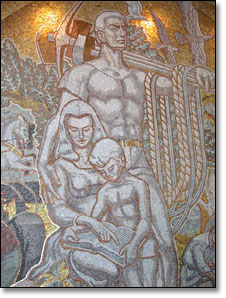
Here you have Scott #1082, with a first day issue of exactly 50 years ago, September 3rd, 1956. The design is by Victor S. McCloskey, Jr. of the Bureau of Engraving and Printing based on a a small portion of a much larger mosaic, “Labor is Life” (also shown below) by the American artist Lumen Martin Winter. This mosaic was unveiled in 1956 by President Eisenhower at the the AFL/CIO Headquarters in Washington DC .

What a difference 50 years makes! One could write at length about how this stamp portrays a quintessentially 1950’s view of the family, the status of women, the industrial base of American labor combined with the influence of depression-era socialist realist art. But it is Labor Day, so I suggest you all get off the computer and start up the grill. That’s what I’m going to do.

Detail from "Labor is Life" mosaic

Filed Under: Philately Tagged With: AFL-CIO, Labor Day, Lumen Martin Winter, Philately, Stamps

A Tale of Two Formats

2006/08/22 By Rob 16 Comments

As he stood staring at them, they asked him no questions, for his face told them everything.

‘I cannot find it,’ said he, ‘and I must have it. Where is it?’

His head and throat were bare, and, as he spoke with a helpless look straying all around, he took his coat off, and let it drop on the floor.

‘Where is my bench? I’ve been looking everywhere for my bench, and I can’t find it. What have they done with my work? Time presses: I must finish those shoes.’

They looked at one another, and their hearts died within them.

Charles Dickens, a careful student of human nature, provides us here a vivid portrait of Dr. Alexandre Manette, who, after being held 18 years in the Bastille, is released, but is unable to adjust to his new freedom, and in times of stress lapses back to the familiarity of his prison labors, making shoes.

We all have been prisoners of Microsoft Office and their proprietary file formats. You may no longer recognize it as a prison, because this cell has been your home for the past 15 years, but here is what it looks like:

  1. Editing a document requires Microsoft Office.
  2. Since Office runs only on Windows, you also require Windows
  3. These restrictions lead to a purely heavy-client view of document processing.
  4. This also leads to a model of programmability that emphasizes storing executable code (macros/script) inside of the document, resulting in years of security nightmares. Here is a typical recital of the known dangers.
  5. If you don’t want to put script inside your document, you could access the data via Office automation API’s, but this again required a machine running Windows and Office.
  6. It also emphasizes a view of WYSIWYG which emphasizes early formatting and layout decisions and de-emphasized semantic richness in documents. For example, see “What has WYSIWYG Done to Us?”.
  7. The tools that were created for us to record our thoughts instead now constrain or even substitute for our thoughts. For example, “PowerPoint Panders to our Weaker Points” in the Guardian, and Tufte’s “PowerPoint is Evil”.
  8. The above also lead to a stifled the market for 3rd party document processing tools. We will never see the value of what was never allowed to occur, but the opportunity cost of the innovation that did not happen in this single-vendor world is enormous.
  9. This also lead to general lack of competition in the productivity editor market, leading to a decade of buggy products with little innovation. Is the “Ribbon” the most we can look forward to?
  10. We’ve been locked into a one-size-fits-all offerings of bloated applications. Many people are over-served by Office and therefor are over-paying for functionality they do not need, while others are under-served by the resulting products they cannot afford.
  11. Functionality has been arbitrarily segregated into three and only three application classes, “Spreadsheet”, “Word Processor” and “Presentation Graphics”.

The move from proprietary binary formats to new standard formats, like OpenDocument Format (ODF), is a movement from imprisonment to freedom. The technical constraints have been lifted, but have we really made the mental adjustments necessary to engage our new freedom? Or are we still silently pacing a 10-foot cell in our minds? If we merely recreate our cell walls in XML, then we are still prisoners.

I am a creature of habit and have been as much a prisoner as you have, so don’t look to me for all the answers. But I do have a few thoughts on what this new freedom might look like.

Instead of being opaque black boxes that can only be used on one vendor’s system, documents will be transparent. Anyone can access them using whatever operating system and whatever tools they want, and for any purpose they want. Python on Linux, REXX on AS/400, and C# on Windows will all have equal opportunity.

This also implies that document processing will no longer be restricted, technically or by license, to the desktop. Innovative things will occur on servers. We’re starting to see some of that with Google Docs and wikiCalc. But that is only the beginning. We will see search engines that can intelligently search content for specific MathML expressions, spiders that will collect and aggregate slides from presentations and allow you to share them, document repositories that will automatically check citations in papers and calculate the intellectual social networks these imply, stock brokers that will allow you to download your statements formatted in a spreadsheet, with additional analytics calculated via spreadsheet formulas. Creating, editing, reading, viewing, storing, collaborating will be able to be done anywhere, from your cellphone to the largest servers.

Since the server typically has access not only to your own documents, but your organization’s as well, as well as easy access to other information about the users, such as your role and group via LDAP, an application can drive workflows that relate the contents of the document to similar content, as well as to you organizational role, and to your business. The companies that unlock the knowledge stored by your knowledge workers in your organization’s documents will be the companies leading us into the next decade.

The old walls will fall that once segregated functionality into the arbitrarily defined boundaries of “Spreadsheet”, “Word processor”, and “Presentation graphics”. Dan Bricklin is leading the way with his wikiCalc. Is it a Spreadsheet or is it a Wiki? If you have to ask the question then you are still a prisoner. The point is wikiCalc is whatever Dan Bricklin wants it to be. That is freedom to innovate. We will see the arbitrary divisions between application genres become fuzzy and fall away as we all recognize our new freedom.

Document programmability will be turned inside-out. Instead of putting code inside of the document, turning documents into virus vectors, the code will be carefully segregated. Once the code and the data are distinct, we can put the code on the server, where it can be more easily managed, maintained, and secured. This clean separation of code and data will be as important to system stability and security as was protected-mode in the 80286 processor when it first enforced this data/code separation at operating system level. I see macro viruses becoming a thing of the past, like smallpox, because the importance of data/code separation will finally be enforced, and users will not be emailing around code disguised in documents.

We will start thinking of documents as data, and as inputs to modules that process data. I see visual design tools that will allow you to drag and drop a document template onto a design surface and expose various fields in the document which can be wired up to databases, web services or other data sources.

I see financial analysts creating financial models in spreadsheets, then converting the spreadsheet into a web application that can then be deployed anywhere to provide browser-based access and execution of the model via any browser.

I see a variety of productivity editors available at a variety of price points, from free, open source ones, to commercial offerings for desktop and other devices, to specialized offerings with extra features for vertical markets, like legal, medical, academic, or scientific uses.

I see an escape from documents-as-pictures, where users sweat over pixel-perfection and pray that the applications don’t screw them up. Today the end user doesn’t worry about font kerning. We rely on the font managers to get this right, and we accept the results, and concentrate on what we, the authors, add to the document. We are freed from that mental burden of kerning. But why stop there? With smarter applications, we will be freed of most or all formatting burdens. We will concentrate on writing, not on styling, and rely on the applications to get the appearance right. This will free our time to give an increased emphasis on semantic richness, putting our knowledge and experience and outlooks and opinions into the document, and encoding it in an way that allows new modes of collaboration and redefines what a document is.

That is a gimpse at what freedom looks like to me. But let’s not forget that being freed is not the same as being free. There are those out there who are attempting to merely recreate the same single-vendor closed system we’ve had for the past 10 years, and recoding it in XML. This may be a comfortable choice to those who have known no other way. But is it really freedom? I look out and see the jailer offering to sell 10-foot apartments to those just released from their 10-foot prison cells. Will you follow?


Change Log

1/30/2007 — updated wikiCalc link, made other assorted wording changes at my whim, corrected a spelling error, changed to curly quotes.

Filed Under: ODF, OOXML

The 96.97 percent problem

2006/08/21 By Rob 6 Comments

The press release puts out numbers of awesome import. We finally have the answers we seek, the science of web analytics and super-duper tools has laid all doubts to rest:

Amsterdam – August 14 2006 – OneStat.com, the number one provider of real-time intelligence web analytics, today reported that Microsoft’s Windows dominates the operating system market with a global usage share of 96.97 percent. The leading operating system on the web is Microsoft’s Windows XP with a global usage share of 86.80 percent. Microsoft’s Windows 2000 has a global usage share of 6.09 percent and is the second most popular OS on the web.

The global usage share of Apple’s Macintosh is 2.47 percent and the global usage share of Linux is 0.36 percent.

So what’s wrong with this picture? The first thing that hits me is that the survey quotes results to four significant digits. This is unusual in a survey of this kind, since it implies error bars of only +/- 0.005%. Now, what probably really happened here is that 96.97 % of the sampled users were running Windows. But to apply that level of precision to the entire population as they do when they call it “a global usage share of 96.97 percent”, that is something else altogether. Just because you can calculate a number does not mean that you know a number.

According to their press release, OneStat sampled 2 million users from those who visited their customers . We’ll deal with the potential bias issues later. But first let’s settle a statistical question, what sample size would be required to know results to 0.005%? This depends on the population size, the number of internet users, which in 2004 was estimated to be 840,000,000 so I’ll use a nice round billion (1,000,000,000) as an estimate for 2006.

There are a number of survey calculators on the web. I use this one from Creative Research Systems. Plug in the numbers into the Determine Sample Size form:

  • Confidence level = 95%
  • Confidence interval 0.005
  • Population: 1000000000

Press Calculate and you will see that the required sample size is around 280 million. So a sample of only 2 million users, even if perfectly sampled, will not allow you to state numbers like 96.97%. It is off by a factor of 100.

So the question then is, how accurate are the results can one expect from “only” 2 million users. You can use the second calculator on that page, and get an answer of around 0.07%. That isn’t bad at all and may allow you to say 97.0 +/- 0.1%, which is nothing to sneeze at.

(You can also use that form to discover some interesting facts, like a random sample of 384 people is enough to represent a population of any size to a 5% confidence level. It is this type of asymptotic behavior which allows market research firms to make predictions about the preferences of people all over the world, doing many small surveys, though you may find that you yourself may never be surveyed in your entire life.)

Now all of this is moot if the 2 million user sample is not representative of the total population. The results may be precise to one decimal place, but are they accurate? Are the people who visit the web sites of OneSite’s customers reflective of all all web users? Are they typical in terms of country, language, income, age, gender, etc? No supporting info is given.

Sampling bias can be a treacherous thing. For example, let’s look at this blog. Over the past few weeks I’ve received 30,807 visitors, of which 6,512 were running Linux and 14,335 were running Firefox. Based on those numbers, and assuming a world-wide web population of 1 billion, I can issue a press release stating the following:

With 95% confidence Linux has a global usage share of 21.1% (+/- 0.1%) and Firefox as a world wide usage share of 46.5% (+/- 0.1%)

Based purely on the numbers, a have a sample size suffiicent to support the stated precision. But do I think those numbers accurately reflect all web users?

In the end, it is a waste of time to do a survey of 2 million users unless you are rock solid sure that they are randomly selected and representative of the entire population. On the otherhand, if you have a truly unbiased sample, you could tell the OS breakdown of the web to 1% precision with a sampling under 40,000 users.

The lesson? Don’t be awed by numbers. There is often less there than meets the eye.

Tech Tags: Statistics Linux Web+Analytics

Filed Under: Uncategorized

  • « Go to Previous Page
  • Page 1
  • Interim pages omitted …
  • Page 4
  • Page 5
  • Page 6
  • Page 7
  • Page 8
  • Interim pages omitted …
  • Page 10
  • Go to Next Page »

Primary Sidebar

Copyright © 2006-2026 Rob Weir · Site Policies