• Skip to primary navigation
  • Skip to main content
  • Skip to primary sidebar

An Antic Disposition

  • Home
  • About
  • Archives
  • Writings
  • Links
You are here: Home / 2006 / Archives for July 2006

Archives for July 2006

Lost in Translation

2006/07/14 By Rob 3 Comments

In the last installment I looked at the way the ODF Add-in for Word 2007 integrates into the Word UI. Now let’s drill down into an actual conversion and see what fidelity we get.

I downloaded the code from SourceForce and installed on a machine running the Office 2007 beta 2. The Add-in pre-reqs the .NET 2.0 runtime, an additional 22MB download. The current version only supports reading ODF documents, not writing, and only handles the word processor ODF format.

Now for fidelity. Since you may not all have Office 2007 beta 2 installed, I’m going to show you the fidelity via PDF exports. In all cases I manually verified that the PDF output was identical to what I saw on the screen, every error is real, nothing introduced by the PDF export process.

First up is a document I call “the sampler”. It has a little bit of all the basic word processor formatting, fonts, alignment, nested tables, graphics, other character sets, headers/footers, images, captions, etc. It is not intended to be a particularly hard test of document conversion, but a basic test of core functionality.

So, here is the sampler, in the original ODF format, as well as the PDF rendering of it in OpenOffice 2.0.3, where it was originally created.

I then exported that file from OpenOffice to Word format. This demonstrates the quality of conversion users already get when running OpenOffice. Here is is in DOC and PDF exported after loaded the DOC file in Word 2007 beta 2.

Good, but not perfect. Some differences:

  • the bullet point size larger in Word than in OpenOffice
  • the nested table collapsed into main table in Word
  • the above table problem causes the table to take up more vertical space, pushing the graphic onto a second page

Again, that is the OpenOffice –> Word conversion we all have available for free today in open source code. Since DOC is a proprietary binary format with inadequate publicly-available documentation, this level of fidelity is impressive. So moving from ISO ODF to Draft Office Open XML should be that much easier, especially since the target format is voluminously documented (4,000 pages and growing), and the writers of the translator are receiving technical assistance from Microsoft.

Let’s take a look. From within Word 2007 (beta 2) I use the ODF Add-in to load the sampler ODF file, and get something that looks like this PDF.

I won’t characterize it but to say it fared less well than I expected. Problems include:

  • headers/footers dropped (data loss)
  • bullet list indentation ignored
  • number list indentation ignored
  • table dimensions messed up
  • caption for the graphics sized and positioned incorrectly

Whether these are all bugs or merely functional limitations is an interesting question. There is a Functional Specification document available on SourceForge for the Add-in which lists these requirement:

2.1.1.1. Basic Formatting

Here is the list of formatting items that the Add-in and command line translator would keep intact. The first 10 in the list are must haves and the last 4 (number 11 to 14) are good to have items of formatting.

  1. Bold
  2. Italics
  3. Underline
  4. Bulleting
  5. Numbering
  6. Indentation
  7. Alignment (Left, Center, Right)
  8. Font size
  9. Font face
  10. Tabs
  11. Tables
  12. Font color
  13. Highlights
  14. Background colors

Tables are “nice to have”? I’d hope so! This does not give me the impression that full fidelity is in their plans. Forget about scripts and macros. They are not even planning on tables or font colors. I hope I am wrong or misinterpreting their plans here, but that is the requirements document they have posted.
Filed Under: Microsoft, ODF Tagged With: Add new tag, Word 2007

Traduttore, Traditore

2006/07/13 By Rob 7 Comments

Brian Jones in his blog entry of 11 July 2006, comments on their recently announced ODF Translator:

It’s directly exposed in the UI. We’re even going to make it really easy to initially discover the download. We already need to do this for XPS and PDF, so we’ll also do it for ODF. There will be a menu item directly on the file menu that takes to you a site where you can download different interoperability formats (like PDF, XPS, and now ODF).

Heck, if you wanted to be even more hardcore, the Office object model allows you to capture the save event. So if you wanted to you could make it so that anytime you hit save you always used the ODF format, just by capturing the save event and overriding it. I’m not expecting folks to do that, but it does show just how extensible Office really is.

One might ask, is it a “hardcore” view to want ODF to be the default format for documents saved in Office? Isn’t this exactly what Massachusetts ITD requested in their RFI?

What Jones does not say is that Word 2007 puts the ODF format at a disadvantage, making it harder than necessary to work with. Although end users are given a simple and direct UI for changing the default file format in Word 2007 to other file formats such as RTF, DOC or even ASCII text, ODF is not allowed as a default. Why should ODF users be forced to use “hardcore” programming to capture the “save event” to accomplish this same task?

Let’s take a look at the UI we’re given. Screen shots are based on Word 2007 Beta 2, and the ODF Add-In for Word 2007.

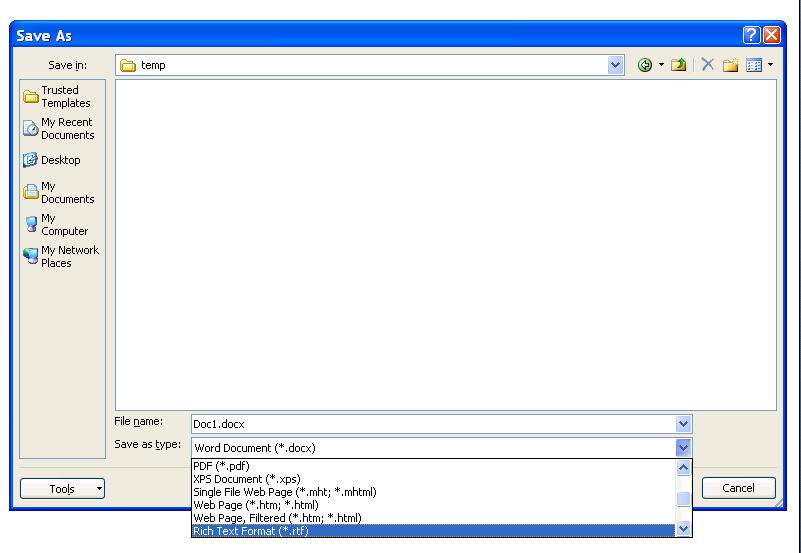
Launch Word, create a document and try to save it, using the File Save menu, or the age-old familiar short cut, Control-S. What do you get? See the following screen shot for the familiar File Save dialog. Although Microsoft formats like DOCX, DOC and XPS are available, as well as export formats like PDF, HTML and Plain Text, you will not find ODF listed.

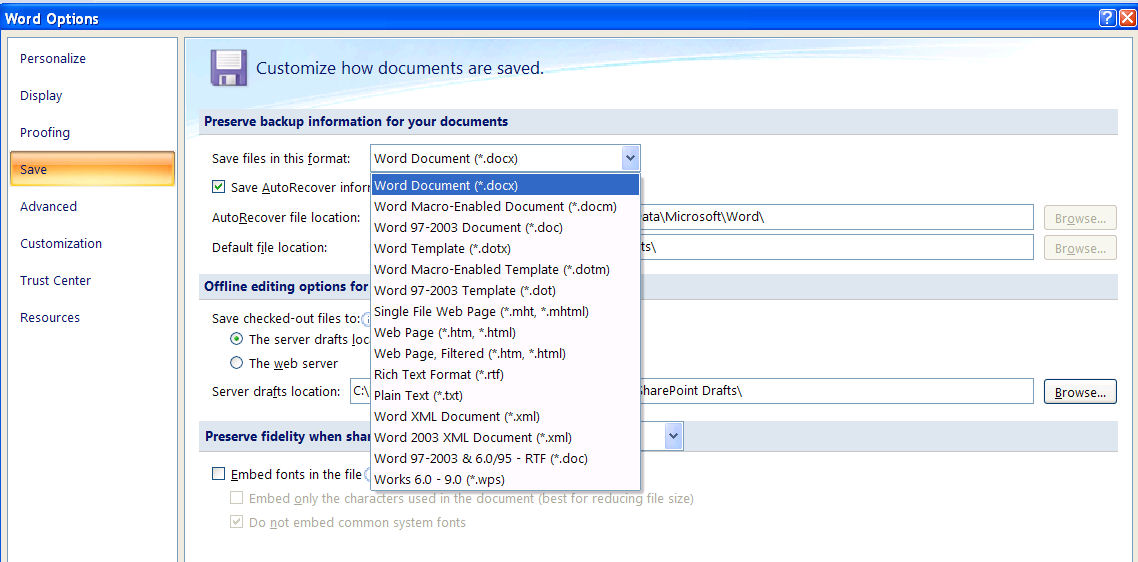
One new twist is the “Tools” button added to the Save As dialog. Pressing that reveals new options including something called “Save Options” which looks like this:

Here we see how Microsoft treats the file formats it favors with first-class support. Word 2007 allows you to choose which file format will be the default format when you save a document. You can keep the default format (Draft Office Open XML) or choose the legacy binary DOC format, HTML, or older formats like RTF or even Plain Text. But you will not find the ISO OpenDocument Format on this list.

So the question to ask is why Microsoft integrates ODF in a way which treats it as a 2nd class citizen, treated less favorably than even Plain Text?

  • ODF cannot be made the default format
  • ODF documents can not be round-tripped
  • ODF documents are not accessible via the familiar keyboard shortcuts for opening and saving files (Control-O and Control-S)
  • ODF documents pay a performance penalty for having to be indirectly converted via Draft Office Open XML rather than via native support

[ 7/2/6/2006 The integration discussion continues here]

Filed Under: Office Tagged With: ODF, ODF Add-in

  • « Go to Previous Page
  • Page 1
  • Page 2

Primary Sidebar

Copyright © 2006-2026 Rob Weir · Site Policies