• Skip to primary navigation
  • Skip to main content
  • Skip to primary sidebar

An Antic Disposition

  • Home
  • About
  • Archives
  • Writings
  • Links
You are here: Home / Archives for 2010

Archives for 2010

The Legacy of OpenOffice.org

2010/11/07 By Rob 18 Comments


When I hear the word “fork”, I reach for my gun.  OK.  Maybe it is not that bad.  But in the open source world, “fork” is a loaded term.  It can, of course, be an expression of a basic open source freedom.  But it can also represent “fighting words”.  It is like the way we use the term “regime” for a government we don’t like, or “cult” for a religion we disapprove of.  Calling something a “fork” is rarely intended as a compliment.

So I’ll avoid the term “fork” for the remainder of this post and instead talk about the legacy of one notable open source project, OpenOffice.org, which has over the last decade spawned numerous derivative products, some open source, some proprietary, some which fully coordinate with the main project, others which have diverged, some which have prospered and endured for many years, others which did not, some which tried to offer more than OpenOffice, and others which attempted, intentionally, to offer less, some which changed the core code  and other which simply added extensions.

If one just read the headlines over the past month one would get the mistaken notion that LibreOffice was the first attempt to take the OpenOffice.org open source code and make a different product from it, or even a separate open source project.  This is far from true.  There have been many spin-off products/projects, including:

  • StarOffice (with a history that goes back even further, pre-Sun, to StarDivision)
  • Symphony
  • EuroOffice
  • RedOffice
  • NeoOffice
  • PlusOffice
  • OxygenOffice
  • PlusOffice
  • Go-OO
  • Portable OpenOffice

and, of course, LibreOffice.  I’ve tracked down some dates of various releases of these projects and placed them on a time line above.  You can click to see a larger version.

So before we ring the death knell for OpenOffice, let’s recognized the potency of this code base, in terms of its ability to spawn new projects.  LibreOffice is the latest, but likely not the last example we will see.  This is a market where “one size fits all” does not ring true.  I’d expect to see different variations on these editors, just as there are different kinds of users, and different markets which use these kinds of tools.  Whether you call it a “distribution” or a “fork”, I really don’t care.  But I do believe that the only kind of open source project that does not spawn off additional projects like this is a dead project.
Filed Under: Open Source

Introducing: the Simple Java API for ODF

2010/11/01 By Rob Leave a Comment

The Announcement

The first public release of the new Simple Java API for ODF is now available for download. This API radically simplifies common document automation tasks, allowing you to perform tasks in a few lines of code that would require hundreds if you were manipulating the ODF XML directly.

The Simple API is part of the ODF Toolkit Union open source community and is available under the Apache 2.0 license.   JavaDoc, demonstration code and a “Cookbook” are also available on the project’s website.

The Background

I first proposed an ODF Toolkit back in 2006, shortly after I got involved with ODF.  It was clear then that one of the big advantages of ODF, compared to proprietary binary formats, is that ODF lent itself to manipulation using common, high level tools. I made a list of the top 2o document-based “patterns of use“, but the key ones are in the following areas:

  • Mail merge style field replacement
  • Combining documents fragments/document assembly
  • Data-drive document generation
  • Information extraction

The hope was that we could it easy to write such applications using ODF.

So why wouldn’t this be easy?   In the end ODF is just ZIP and XML and every programming platform knows how to deal with these formats, right?

Yes, this is true.  However there clearly are a lot of details to worry about.  Although ZIP and XML are relatively simple technologies, defining exactly how ODF works requires over a thousand pages.  This level of detail is necessary if you are writing a word processor or a spreadsheet.  But you really don’t need to know ODF at this level in order to accomplish typical document automation tasks.

There have been several other attempts at writing toolkits in this space.  Some, such as the ODF Toolkit Union’s ODFDOM project have aimed for a low-level, Java API, with a 1-to-1 correspondence with ODF’s elements and attributes.  Others, like lpOD’s Python API have taken a higher-level view of ODF.  You can make a good argument for either approach.  Each has its advantages and disadvantages.

The advantage of the low-level API is that if want to manipulate an existing ODF document, which in general can contain any legal ODF markup, then you need an API that understands 100% of ODF.  But in order to understand that API would require understanding the entire ODF standard.  So that is too complicated for most application developers.

If you write a high level API, then it may be easy to use, but how can you then guarantee that it can losslessly manipulate an arbitrary ODF document?

I think the best approach might be a blended approach.  Build a low-level API that does 100% of ODF, and then on top of that have a layer that provides higher-level functions that do the most-common tasks.  This gives you the benefits of completeness and simplicity.  This is the approach we have taken with the Simple Java API for ODF.   It is built upon the schema-driven ODFDOM API, to give it a solid low-level foundation.  And on top of that it adds high-level functions.  How high?  The aim is provide operations that are similar to what you as an end-user would have available in the UI, or what you as an application developer would have with VBA or UNO macros.  So adding high level content, like tables or images.  Search and replace operations.  Cut and paste.   Simple, but still powerful.

A Quick Example

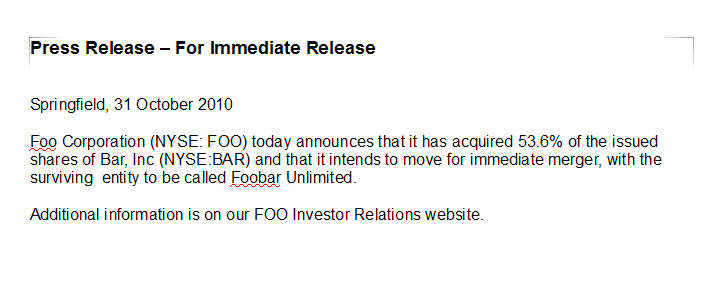
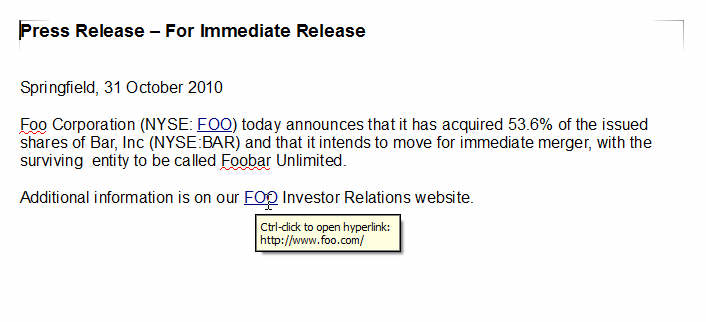
As a quick illustration of the level of abstraction provided by the Simple Java API for ODF, let’s do some simple app.  We want to load ODF documents, search for stock ticker symbols and add a hyperlink for each one to the company’s home page.

So, start with a document that looks like this:

We want to take that and find each instance of “FOO” and add a hyperlink to “http://www.foo.com” and so on.  If you tried this operation with an ODF document directly, it could certainly be done.  But it would require a good deal of familiarity with the ODF standard.  But using the Simple API you can do this without touching XML directly.

Let’s see how this is done.


// basic Java core libraries that any Java developer knows about
import java.net.URL;
import java.io.File;

// Simple API classes for text documents, selections and text navigation
import org.odftoolkit.simple.TextDocument;
import org.odftoolkit.simple.text.search.TextSelection;
import org.odftoolkit.simple.text.search.TextNavigation;

public class Linkify
{
    public static void main(String[] args)
    {
        try
        {
            // load text document (ODT) from disk.
            // could also load from URL or stream
            TextDocument document=(TextDocument)TextDocument.loadDocument("foobar.odt");

            // initialize a search for "Foo".
            // we'll be adding regular expression support as well
            TextNavigation search = new TextNavigation("FOO", document);

            // iterate through the search results
            while (search.hasNext())
            {
                // for each match, add a hyperlink to it
                TextSelection item = (TextSelection) search.getCurrentItem();
                item.addHref(new URL("http://www.foo.com"));
            }

            // save the modified document back to a new file
            document.save(new File("foobar_out.odt"));
        }

        catch (Exception e)
        {
            e.printStackTrace();
        }
    }

}

Run the code and you get a new document, with the hyperlinks added, like this:
Simple enough? I think so.

How to get involved

We really want your help with this API.  This is not one of those faux-open source projects, where all the code is developed by one company.  We want to have a real community around this project.  So if you are at all interested in ODF and Java, I invite you to take a look:

  1. Download the 0.2 release of the Simple Java API for ODF.  The wiki also has important info on install pre-reqs.
  2. Work through some of the cookbook to get an idea on how the API works.
  3. Sign up and join the ODF Toolkit Union project.
  4. Join the users mailing list and ask questions.  Defect reports can go to our Bugzilla tracker.
  5. If you want to contribute patches, more info on the wiki for how to access our repository.

Filed Under: ODF

ODF Plugfest — Brussels

2010/10/28 By Rob 4 Comments

A couple of weeks ago I was in Brussels to participate in the 4th ODF Plugfest.  I planned on writing up  a nice long post about it.  But right when I started to draft this blog post, I came across an excellent article in LWN.net by Koen Vervloesem (Twitter @koenvervloesem): ODF Plugfest: Making office tools interoperable.  Since his article is far better than what I would have written,  I recommend that you go and read that article first, and then come back here for what meager additional scraps of insight I can add.

Go ahead.  I can wait.  I’ll be here when you get back.

The ODF Plugfest format is a two-day event.  On one day engineers from the vendors work together, peer-to-peer, on interoperability testing, debugging, resolving issues, etc.  This is done in a closed session, with no press present, and with a gentlemen’s agreement not to use information from this session to attack other vendors.  We want the Plugfest to be a “safe zone” where vendors can do interoperability work where it is most needed, using unreleased software, alpha or beta code in some cases.   For this to work we need an environment where engineers can do this work, without fear that each bug in their beta product will be instantly maligned on the web.  This would be anti-productive, since it would repel the very products we need most to attend Plugfests.

I think customers would be proud to see their vendors putting their differences aside for the day to work on interoperability.  Although among the vendors and organizations present there were several fierce competitors, two parties to a prominent patent infringement lawsuit and both sides of a prominent fork of a popular open source project, you would not have guessed this if you watched the engineers collaborating at the Plugfest.   A key part to this neutrality is that the Plugfests are sponsored and hosted by public sector parties and universities and non-profits.  In this case we were hosted by the Flemish government.

So that was the first day of the Plugfest, and for the details I can say no more, for the reasons I’ve stated.

On the 2nd day we have a public session, with vendors, but also the press, local public sector IT people, local IT companies, etc.  The program and presentations are posted.  My presentation on ODF 1.2 is also up on my publications page.

A few leftover notes that I have not seen mentioned elsewhere:

  • We had great participation from AbiWord, where developers apparently have funding to work on their ODF 1.2 support.
  • DIaLOGIKa announced that after their next release they will no longer have funding from Microsoft to continue work on their ODF Add-in for Office.  The code, however,  will remain as open source.  Since Oracle has commercialized the previously free Sun ODF Plugin, this means that there is no longer any free, actively developed means of getting ODF support on Office 2003.  If you want ODF support on Office, you must upgrade to Office 2007 or Office 2010.
  • Some good demos of new ODF-supporting software, including LetterGen, OFS Collaboration Suite, ODT2EPub and odt2braille.
  • Itaapy announced that they were close to releasing a C++ version of their popular lpOD library (already available in Python)

In standards work, on committees with endless conference calls and endless draft specifications and the minutia of clause and phrase, it is too easy to mistakenly view that narrow world as your customer.  So when I attend events like this and see the rapid growth of ODF-supporting software and the innovative work that is happening among implementors, I return reinvigorated.  These are the real customers.  This is what it is all about.  I’m already looking forward to the next ODF Plugfest.

Filed Under: Interoperability, ODF

Weekly Links #24

2010/10/09 By Rob Leave a Comment

  • Sean McGrath: KLISS: Author/edit sub-systems in legislative environments

    “KLISS [Kansas Legislative Information Services System] makes extensive use of ODF for units of information in the asset repository. “

    tags: ODF

  • Here there be Dragons | IT PRO blogs

    “Meanwhile, in organisations not beholden to the great god of Seattle, they have gone for free software or bought in one of the many cheap, reliable and better options. Such as SunOffice, NeoOffice and OpenOffice. Their users happily swap ODF files between each other and can all access them. The software is clean and easy to use and did I mention free?”

    tags: ODF

  • IDUG Solutions Journal [PDF]

    Includes an article “Using DB2 pureXML and ODF Spreadsheets”

    tags: ODF

Posted from Diigo. The rest of my favorite links are here.

Filed Under: Weekly Links

ODF Ingredients

2010/10/05 By Rob 2 Comments

I think you will enjoy this graphic. Click for a larger view.  This is a chart of all of the standards that ODF 1.2 refers to, what we standards geeks call “normative references”.  A normative reference takes definitions and requirements from one standard and uses it, by reference, in another.  It is a form of reuse, reusing the domain analysis, specification and review work that went into creating the other standard.  Each reference is color coded and grouped by the organization that owns the referenced standard, W3C, IETF, ISO, etc., and placed on a time line according to when that standard was published

I’m sure each reader will note interesting patterns on their own, but a few things stood out in my mind when looking at this chart:

  • ODF is very much built on top of web and internet standards from the W3C and IETF.  That is where the bulk of our references are from.  This is true not only of the older stuff from the web’s initial standardization effort in 1998-2000, but also for more recent work like GRDDL, RDFa and XForms 1.1.  As documents start living more of a dual-life, on the desktop and on the web (and even mobile), this web standards heritage of ODF will continue to open new doors for ODF implementors and users.
  • Except for a few bedrock standards like Unicode, ISO just doesn’t register.  They simply are not doing a lot of relevant work in this area.
  • A good response when you are faced with critics who claim that ODF is just based on what OpenOffice.org does.  You can point out that OpenOffice was first released as open source in  2000 and via StarOffice had a proprietary history going back to 1984.  So if ODF is merely a dump of what OpenOffice does, then why is ODF built on so many standards that did not exist in 2000?  Does time travel explain it?  Or maybe clairvoyance?  Or maybe, just maybe it is just good engineering to reference relevant standards in your domain rather than reinvent a proprietary version of everything?

Filed Under: ODF

  • « Go to Previous Page
  • Page 1
  • Page 2
  • Page 3
  • Page 4
  • Interim pages omitted …
  • Page 13
  • Go to Next Page »

Primary Sidebar

Copyright © 2006-2026 Rob Weir · Site Policies